
Destroying records on schedule is the straightforward part. Proving what you destroyed, a year later, to somebody who was not there, is where most programmes come apart.
A three part series on disposition review in Microsoft Purview. How it works, what it takes to configure, and what you are left holding after the content is gone.
Part 1. How disposition review works in Microsoft Purview
Part 2. Disposition review permissions and 5 costly mistakes
Part 3. Proof of disposal (you are here)
The question auditors actually ask
Purview proof of disposal is the part of a records programme nobody tests until somebody from outside asks to see it.
And when they do, they rarely open with “show me that you deleted it”. They open with something harder. Tell me what you destroyed under this schedule last year, what class of record each item was, who approved it, and on what basis.
That is a different question. The first is about an action. The second is about evidence that outlives the action. In Purview, the thing being destroyed takes a fair amount of that evidence with it.
What Purview proof of disposal actually captures
Every reviewer action lands in the Microsoft 365 unified audit log. There are four disposition review activities, and these are the names you will search for.
| Activity | What it tells you |
|---|---|
| Approved disposal | A reviewer approved the item. In a single stage label that marks it for permanent deletion. In a multi stage label it moves the item to the next stage. |
| Extended retention period | A reviewer chose to keep the item longer. Useful evidence in its own right, because it shows the review was doing something. |
| Relabeled item | The item moved to a different retention label and left the original review. |
| Added reviewers | Somebody brought another person into the current stage. |
Each record carries the item, where it lived, the label that governed it, who acted, when they acted, and the comment they typed if they typed one.
One detail that matters for reporting. Auto approval has no activity of its own. When nobody acts and Purview advances the item automatically, it still writes an Approved disposal record, and you have to look inside the record to tell whether a person decided or a timer expired.
Getting the records out
Two routes, serving different purposes.
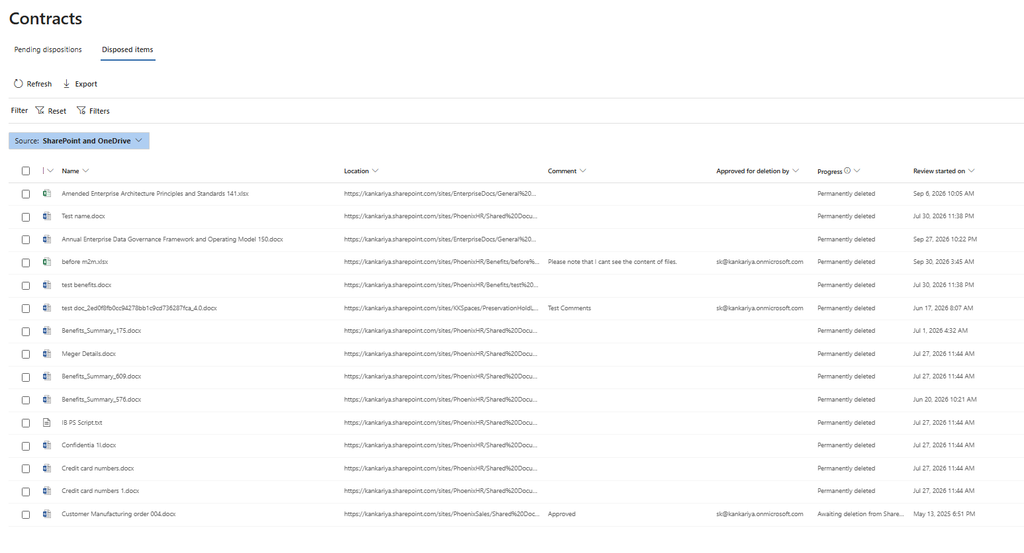
The Disposed items tab in Records Management is the one you show people. It lists what has been destroyed, filters by deletion date, and exports to CSV. It also picks up items marked as records that were deleted automatically at the end of their retention period without a review, which appear with a type of Records Disposed.
The unified audit log under Audit and Search is where you go when somebody wants the detail behind it. Search the four activities above, filter by date or reviewer, export.
So far so good. The trouble starts with what those records cannot tell you, and all three of the following survive a completely correct configuration.
Gap 1. The metadata dies with the file
This is the one that hurts, and it rarely surfaces until somebody asks for a destruction certificate.
Your record tells you a file called Q3_Report_Final.docx was deleted from a Finance site on a given date by a given reviewer. Useful enough. But what class of record was it? What was its file plan reference, its classification code, its matter number or contract ID?
All of that lived in SharePoint columns on the document. The document is gone, so the columns went with it. The audit record preserves the act of deletion rather than the identity of the thing deleted.
For plenty of organisations that is survivable, because the file name and location carry enough meaning. For anyone working to a formal file plan, or in a sector where you have to state which record class was destroyed and under which authority, a file name is not an answer. You either reconstruct it from whatever you happened to export beforehand, or you cannot answer.
Gap 2. Items are reviewed without the file they belong to
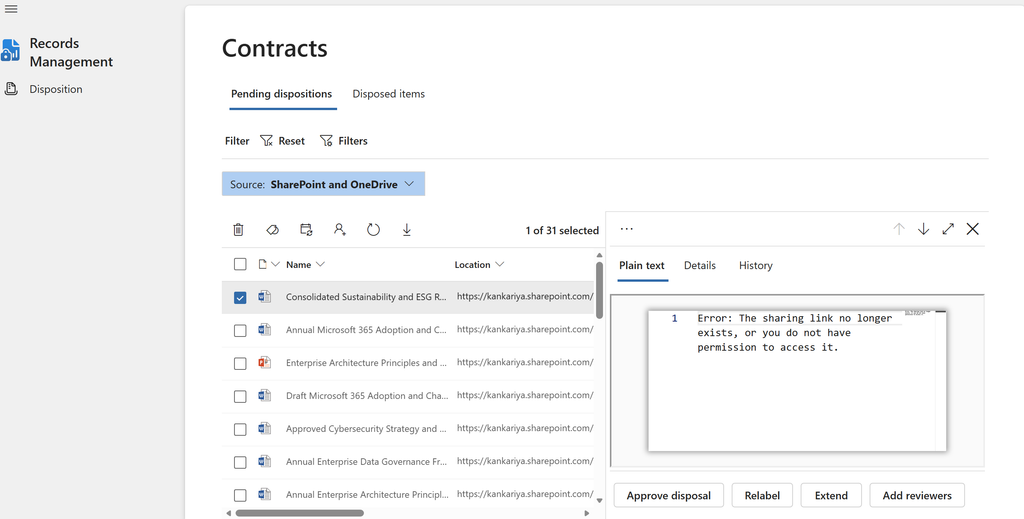
Retention labels apply to individual items. Disposition review therefore presents individual items. A reviewer opens their queue and sees five documents, with no sight of the 895 others in the library those five came from, and no sight of the case, matter or series they belong to.
This runs against how records actually work. A record takes much of its meaning from its aggregation. The individual memo means one thing on its own and something else as the fourth document in a disciplinary case file. Strip the aggregation away and the reviewer is making a destruction decision on an artefact they cannot place.
The defensibility consequence is the part worth sitting with. You can produce a certificate showing the item was destroyed, with a named approver and a timestamp, and still be unable to show that the approver understood what they were approving. The evidence is intact. What it attests to is a decision made without the context needed to make it.
It compounds with the access problem from the permissions post. A central reviewer who cannot open the file and cannot see the aggregation it sits in is approving a file name and a date, twice removed from the record itself.
WORTH CHECKING
Look at a live disposition queue and ask what a reviewer could reasonably conclude from what is in front of them. If the answer is “not much without going and finding the source library”, that is the gap, and no amount of configuration closes it.
Gap 3. Your evidence has an expiry of its own
This one catches the people who did everything else right, and there are two clocks running.
The first is proof of disposition itself. Microsoft states the limit plainly. Proof of disposition is kept for up to seven years after the item was disposed.
Seven years sounds generous until you hold it against a real retention schedule. Plenty of record classes carry obligations that run longer, and some sectors expect destruction evidence to be available permanently. If your schedule says you must account for a record for twenty years, seven years of proof does not get you there. The record is gone, and in time so is the evidence that you disposed of it properly.
The second clock is the unified audit log, and it runs shorter. Audit records are kept for 180 days on non E5 licensing, or a year by default with Audit Premium under E5. Longer is possible with a separate ten year audit log retention add on assigned to the relevant users, which is not included in E5.
So the Disposed items view and a raw audit search can answer differently depending on how far back you reach. Worth knowing which one your reporting actually depends on.
THE FIX IS THE SAME EITHER WAY
Export your disposal records on a schedule and hold them somewhere you control, on your own retention terms. Setting that up at the start costs almost nothing. Discovering you needed it in year eight is a different conversation.
A different approach
Every one of these problems comes back to the same thing. The evidence is assembled after the fact, from a log that was never designed to be your register of destroyed records. So Paras InfoGov built ExpireIQ to keep that register itself.
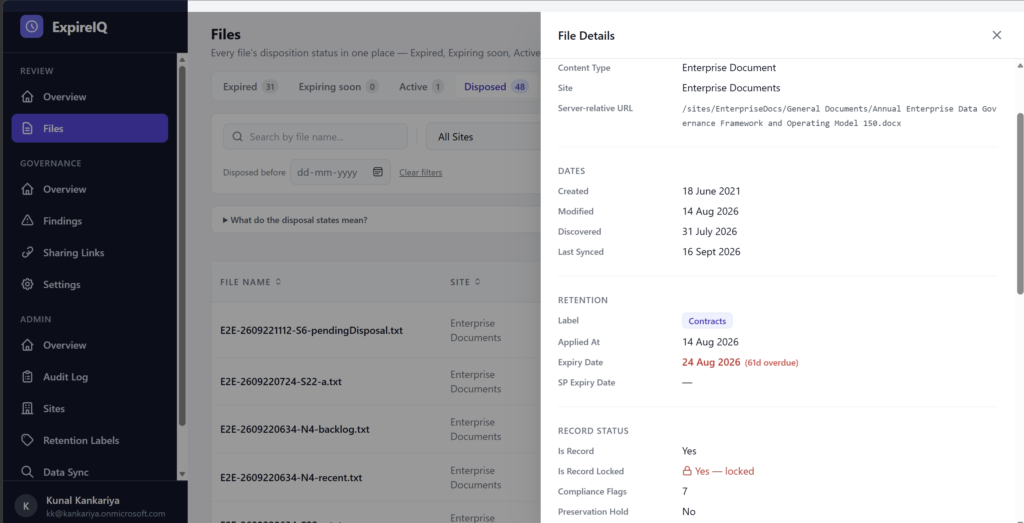
ExpireIQ captures the file’s metadata at the point of review, before deletion runs, and holds it in its own register of disposed items. When the document is gone and its SharePoint columns went with it, you still have the classification, the reference numbers and the context that tell an auditor what class of record was destroyed rather than only what the file happened to be called.
That register sits in your own Azure tenant on your retention terms. Your proof stays as long as your retention schedule says it should, rather than as long as your audit licensing allows.
It also means the record of a disposal decision lives somewhere you can build on, which is where the context problem starts to become tractable rather than structural.
If defensible destruction evidence is a genuine requirement for your organisation, ExpireIQ is worth a look.
Where Purview proof of disposal leaves you
Before you rely on it as your evidence, work through these.
- You have run a Disposed items export and looked at the columns, so you know what it actually contains rather than what you assume.
- You have decided what happens to the metadata that disappears with each deleted file, and whether a file name satisfies your file plan.
- You have looked at a live review queue and judged whether a reviewer can place the items in front of them.
- Your obligation to produce destruction evidence is shorter than seven years, which is the documented proof of disposition limit, or you are exporting and archiving those records yourself.
- You can tell an automatic approval from a human one in your exported records, if your reporting needs that distinction.
- Auditing was enabled before your first disposal ran, because that cannot be fixed afterwards.
Need to prove what you destroyed?
Paras InfoGov can help you build evidence that holds up
Whether it is designing a disposal reporting process, working out what your audit log will and will not give you, or getting a retention programme audit ready, Paras InfoGov works with compliance teams on exactly this.
And if holding your own defensible record of what was destroyed is what you are after, ExpireIQ is built for exactly that.